

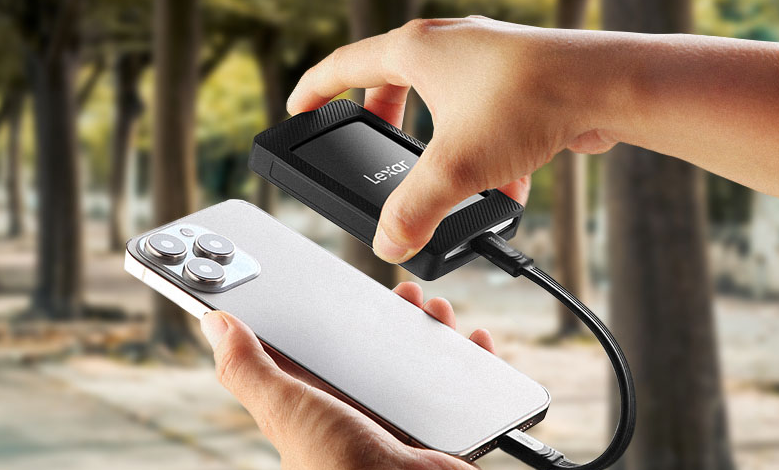
An external ssd has become one of the most popular storage solutions for people who need speed, reliability, and convenience. Unlike traditional hard drives, SSDs offer faster data transfer, better durability, and improved performance, making them ideal for both work and personal use.
Whether you want to back up important files, store large media projects, or carry data with ease, an external SSD can provide the efficiency and portability you need. In this article, we will explore the top benefits of using one today.
What is an External SSD?
An external SSD is a portable storage device that uses solid-state technology for faster data transfer than traditional hard drives. It’s durable, lightweight, and versatile, making it ideal for backups, media storage, and file transfers. It combines the speed of an internal SSD with the convenience of portable storage for personal or professional use.
Key Benefits of Using an External SSD
Using an external SSD instead of a traditional hard drive (HDD) comes with several key benefits:
Enhanced Speed and Performance
External SSDs deliver significantly faster data transfer rates than HDDs. This means quicker access to files, shorter application load times, and smoother handling of large files such as high-resolution videos or complex datasets.
Superior Portability and Durability
SSDs have no moving parts, which makes them much more resistant to bumps, drops, and vibrations. This makes them perfect for carrying around, whether you’re traveling, commuting, or working on the go.
Energy Efficiency
SSDs consume less power than traditional hard drives, helping to extend laptop battery life and reduce energy costs for desktops. This makes them a more eco-friendly and cost-efficient option.
Advanced Security Features
Many external SSDs come with built-in encryption and password protection, providing an extra layer of security for sensitive files. These features are especially valuable for professionals handling confidential data or anyone concerned with privacy.
Versatility and Compatibility
External SSDs work with different devices, including laptops, desktops, gaming consoles, and mobile devices. Their versatility makes them suitable for tasks like gaming, media editing, backups, and general file transfers.
External SSDs are faster, more durable, energy-efficient, secure, and widely compatible, making them better than traditional HDDs for most users.
Use Cases for External SSD
External SSDs are versatile storage devices suitable for different applications. Here are some common use cases:
Gaming
Store large game libraries and reduce load times.
Ideal for consoles like PS5, Xbox Series X/S, and gaming PCs.
High-speed SSDs ensure smooth gameplay and quick access to games.
Content Creation
Perfect for photographers, videographers, and designers.
Store and edit high-resolution videos, large photo libraries, and complex design files.
Fast read/write speeds enable efficient media editing on the go.
Professional Work
Secure storage for sensitive files and important documents.
Easy backup solution for work data.
Portable and compatible with both Windows and macOS systems.
Everyday Use
Store personal documents, photos, videos, and music.
Lightweight and compact, making it easy to carry.
Plug-and-play functionality for simple file transfers without additional software.
Travel and Mobility
Rugged SSDs are built to resist drops, vibrations, and physical shocks.
Ideal for users who need reliable storage on the move.
Backup and Archiving
Use as a secondary storage device for automatic or manual backups.
Maintain free space and keep important data safe without relying solely on cloud storage.
External SSDs provide fast, durable, and portable storage solutions for gaming, creative work, professional tasks, daily file storage, travel, and backups, making them suitable for almost any type of user.
Choosing the Right External SSD
Choosing the right external SSD for your laptop involves considering several key factors to ensure optimal performance, compatibility, and value. Here’s a guide to help you make an informed decision:
Storage Capacity
Determine the amount of storage you need based on your usage:
- Basic Users: A 250GB to 500GB SSD is enough for storing documents and light media files.
- Media Enthusiasts: If you handle large video files, music libraries, or extensive photo collections, consider a 500GB to 1TB SSD.
- Professionals & Gamers: Choose a 1TB or larger SSD for heavy apps, video editing, or gaming to store big files and keep performance smooth.
Interface and Compatibility
The connection type between your SSD and laptop affects data transfer speeds:
- USB 3.2 Gen2: Common and offers good performance for most users.
- USB-C: Provides faster data transfer rates and is becoming the standard for newer laptops.
- Thunderbolt 3: Offers the highest speeds (up to 40 Gbps) but requires compatible ports on your laptop.
Ensure that the SSD’s interface matches your laptop’s available ports to achieve optimal speeds.
Performance and Speed
When choosing an external SSD, check its read and write speeds. Higher read speeds help you open files quickly, while higher write speeds make saving or transferring large files faster. Compared to external hard drives, external SSDs are much faster making tasks such as copying videos, installing software, or running apps much smoother.
Durability and Portability
If you plan to carry your SSD often, choose one that is shock-resistant and has water or dust protection. Also, make sure it is lightweight and compact so it’s easy to take with you anywhere.
Security Features
For sensitive data:
- Encryption: Some SSDs offer hardware encryption to protect your files.
- Password Protection: Look for drives that provide password security options.
These features add an extra layer of security, especially for professionals handling confidential information.
Price and Brand Reliability
Choose an SSD that balances cost with the features you need, and stick to reputable brands like Adata, Samsung, SanDisk, and Crucial for better reliability, support, and updates. Longer warranties can also indicate higher product quality.
Additional Features
Consider any extra features that may be beneficial:
- Cross-Platform Compatibility: Ensure the SSD works with your operating system.
- Software Bundles: Some SSDs come with backup or security software.
- Warranty: A longer warranty period can provide peace of mind regarding the drive’s longevity.
By evaluating these factors, you can select an external SSD that best fits your needs, ensuring enhanced performance, security, and reliability for your laptop.
Conclusion: External SSD
An external SSD is a fast, durable, and portable storage solution that outperforms traditional hard drives in nearly every aspect. It offers quick data transfer, reliable durability, energy efficiency, advanced security, and broad compatibility, making it ideal for gamers, content creators, professionals, and everyday users alike.
Choosing the right external SSD involves considering storage capacity, connection type, speed, durability, security features, brand reliability, and budget. By matching these factors to your needs, you can enjoy faster file access, safer data storage, and convenient portability. Whether for gaming, media editing, work, travel, or backups, an external SSD provides a versatile and efficient way to store and manage your data.